Tuesday, January 12, 2010

Beta Programs

Did you know that all users with maintenance agreement can apply to participate in the StruSoft Beta Programs?
  • Learn about the new features
  • Prepare your organization for the upgrade
  • Contribute to the development
Current Beta Programs are:
  • WIN-Statik 6.1
  • FEM-Design 9.0
  • IMPACT 10.0
Please apply by sending an email to info@strusoft.com with your name, company and address. Don't forget to write which Beta Program you are interested in.

Monday, December 21, 2009

2009

In May we released IMPACT 9.0, the new generation of precast modeling and detailing tools. The new database will be a robust foundation for the continuous development of IMPACT. The release also included among others new drawing layout tools, improved hollow core element types and several production features like; reinforcement collision checks, mass and size rules for forms and reinforcement, and much more.

In June we released FEM-Design 8.04 with the new Revit FEM-Design Add-In 1.0.

The development of the next IMPACT version 10 started already in April and in August we could test construction site tools like crane-, erection- and transportation (stack) planning. IMPACT Reinforcement 10.0 was released in September and IMPACT Precast 10.0 will be released during the beginning of 2010. IMPACT 10.0 will have more planning features and new tools for all kinds of columns and beams.


IMPACT 10.0 is compatible with AutoCAD 2010 and will also come with new Revit IMPACT Add-Ins. SQL Server 2008 will be supported.

During the whole year we have been working with FEM-Design 9.0, with a completely new graphical engine, much faster calculation and automatic design. FEM-Design 9.0 will be released during the beginning of 2010.


We look forward to make many more good and integrated releases in 2010 and we wish you all

Merry Christmas and Happy New Year


The current releases are:

FEM-Design 8.04.012
Revit FEM-Design Add-In 1.1.002
IMPACT Precast 9.0.017 and Reinforcement 4.1.003
IMPACT Reinforcement 10.0.000
WIN-Statik Concrete Prestressed 6.0.001

Wednesday, December 16, 2009

Hollowcore Online


Together with the Hollow Core Slab producers in Sweden
we have made a calculation guide according to Eurocode.

It is a free service on internet, it is in English and it is
very easy to use. Please click on the picture and try it yourself.

Friday, November 27, 2009

3D Viewer

Here is another IMPACT model made by Prekon i Syd AB in Lund, Sweden.


I'm using Navisworks Freedom 2010 to view this model.

Wednesday, November 25, 2009

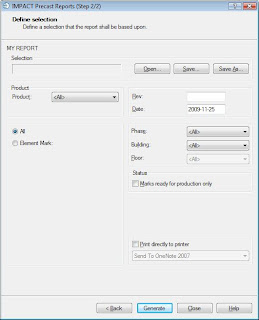
Designing your Report

This is about how to make you own report. When you design your own report you can choose from four different types of selections: Element Mark, Element ID, Reinforcement, Cast-In Material or Drawings.

I will show you how to make an Element Mark Report.

1. First I will make a template in Excel.
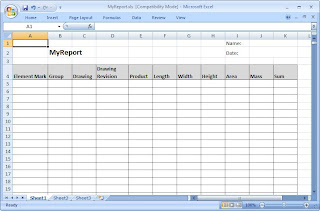


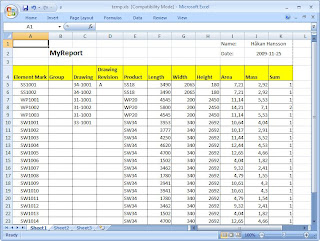
Line 1-4 is the 'Header Section', here I would like to have name in cell (10,1) and date in cell (10,2). Line 5- is the 'Selection Section'. I would like to have 11 columns in the report with the same data as the 'Element Mark' table in the 'Project Manager' (PM).

The template should be saved in the templates_reports folder e.g. '...\impact_1101\common\1100\1100\templates_reports\MyReport.xls'

2. Now I have to add and configure the new report in 'Administrative Tool' (AT)
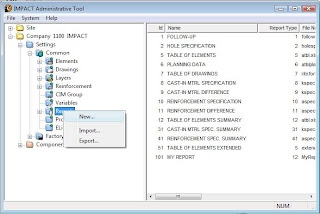


Right click on the Reports node and select new.
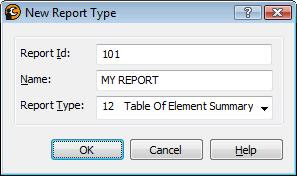


Write Report Id and Name. Report Type should be 12.
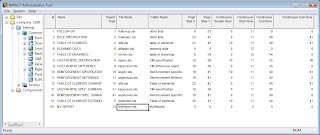


File name should be the template file name e.g MyReport.xls. The continuous section starts at row 5 and has no end row (0). I have chosen to have no max page size (0,0) and no continuous header (0) or footer (0).

Now I have to tell AT where to put data in the Excel file.
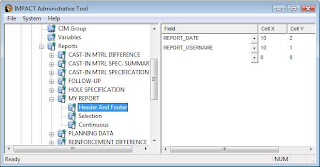


Add the two fields to the Header Section
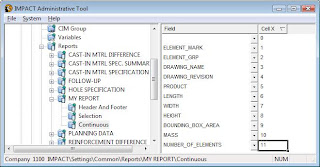


Add columns to the Continuous Section.

The configuration is done!

3. Update the Report in PM

All report templates are copied to the project once when the project is created.
If the report is new or changed I have to update my project template.
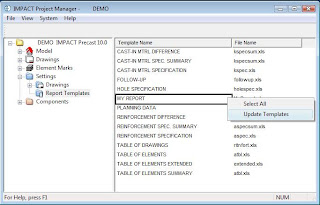


Right click and select 'Update Template'.

4. Generate the report in PM


Good Luck!